For workforce development organizations
Make Your Participants’ Skills and Career Readiness Visible
VizID helps workforce development programs turn participants’ skills, credentials, experiences, projects and progress into visual career identities that employers can understand.
Designed for workforce organizations serving emerging talent, career changers, and adults building their next opportunity.




The visibility problem
The problem may not be a talent gap. It may be a visibility gap.
Participants finish programs with real skills, credentials and completed work. A one-page résumé rarely shows any of it.
A résumé shows
- Job titles and dates
- A list of course names
- Text an employer must interpret
A VizID shows
- Photos of actual work
- Projects, credentials and progress
- Proof an employer can see in seconds
How VizID works
Four steps, start to shared.
- Step 1
Build
An AI-assisted résumé import starts the profile in minutes — no design work, no blank page.
- Step 2
Show
Participants add photos, projects, credentials and real work as visible proof.
- Step 3
Prepare
A guided Progress Journey celebrates each real milestone toward career readiness.
- Step 4
Share
One link and QR code they keep — openable on any employer's phone.
For participants
Something better to send than a résumé.
- A career identity that shows work, not just bullet points
- Photos, projects, credentials and recommendations in one place
- One shareable link and QR code they keep after the program
- Progress framed as growth, never as what's missing
- Interview and employer-conversation material they can point to

For your organization
What your staff and program get.
Participants own their profiles. Your team gets visibility into the work.
An organization workspace
Invite participants and staff, manage seats and see cohort activity in one place.
Visible progress
Follow participation and career-readiness progress across cohorts over time.
Reporting you can show
Real artifacts and completion data make board and funder reporting concrete.
Employer conversations
Hiring partners can review a participant's work in under a minute.
Staff-friendly
Coaches support building without doing the work for participants.
Safeguards for younger participants
Age-aware protections limit public exposure and route outside requests to program staff.
Who it’s for
Built for workforce development organizations.
- Michigan Works! agencies
- Community workforce programs
- Youth employment programs
- Reentry employment programs
- Nonprofit workforce providers
- Career-readiness and training programs
Career pathways
Every path a participant may be heading toward.

See a real VizID
Open one. It explains itself in seconds.
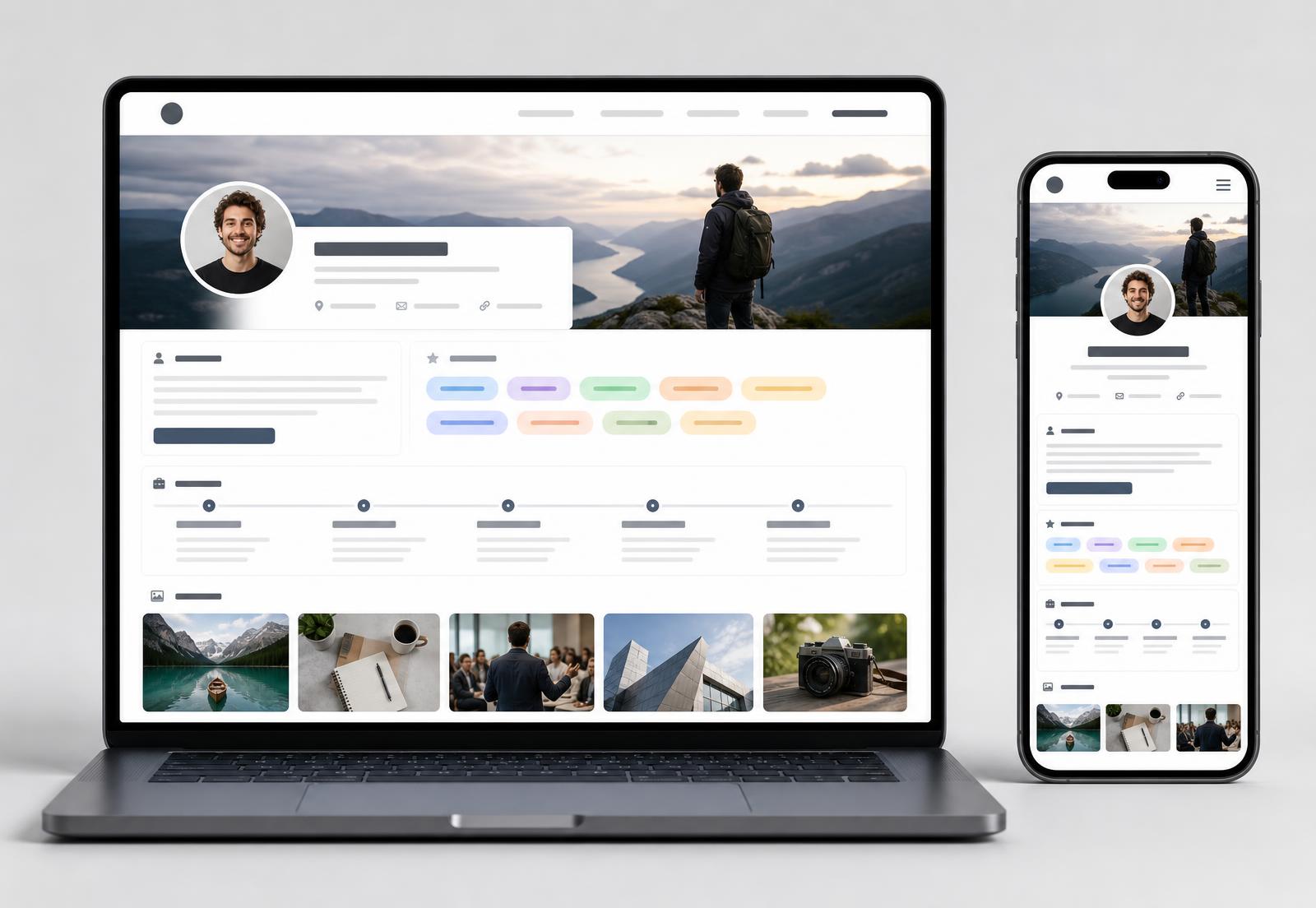
Every VizID follows the same layout, so participants across your program look consistent and professional — on a laptop or a phone.
- Photo header, portrait and identity block
- Skills, experiences, projects and visual proof
- A Progress Journey showing career readiness over time
Explore a VizID pilot
Start with one cohort, not a rollout.
A pilot is a short, scoped engagement with a single cohort so your team can see what participants produce before committing further. Scope, size and timing are agreed together.
Younger participants are covered by age-aware safeguards: reduced public exposure and outside requests routed to program staff.
What a pilot can include
- A defined cohort of participants
- Staff onboarding and a shared workspace
- Résumé import and profile-building sessions
- Progress check-ins during the cohort
- A review of what participants produced
- A shared decision about what comes next
Request a demo for your workforce program
Tell us about the people you serve and we'll tailor the walkthrough to your program.
Fields marked are required.
Make More of Your Participants’ Potential Visible
See how VizID fits your program, then decide whether a pilot makes sense.